Turn every enquiry into a decision you can see.

AI-enabled software for coaching institutes. It helps you get more admissions from the enquiries you already receive, and collect your fees on time.

Free demo on your own branch data. Nothing to install.

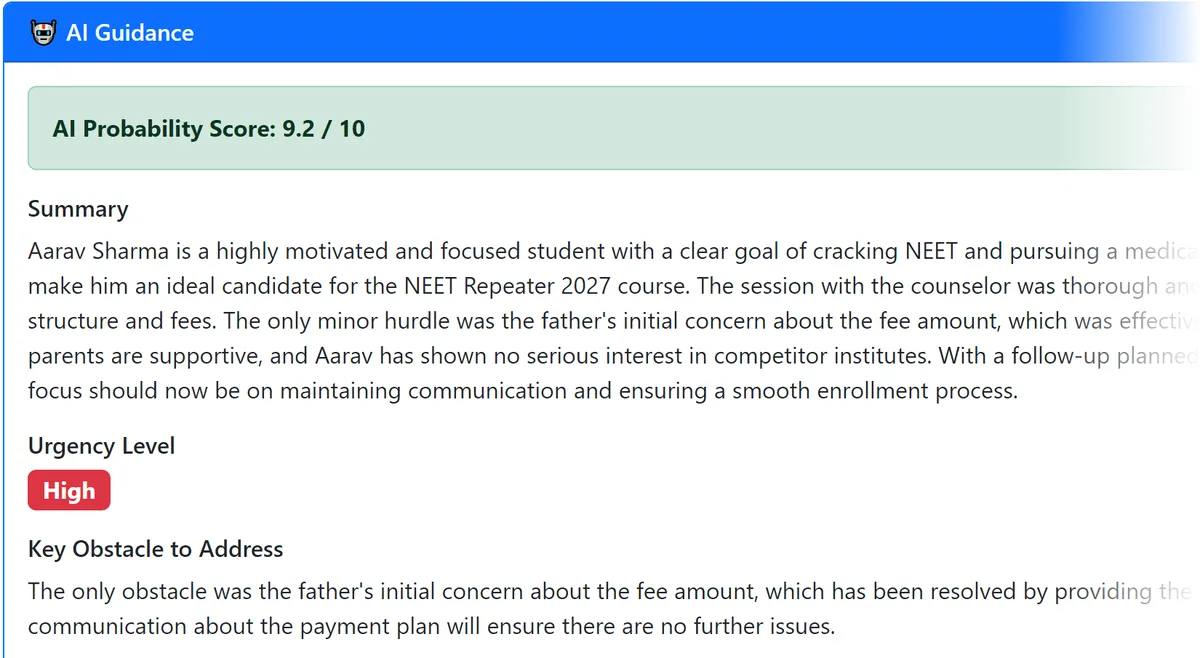
AIVidyalay AI report for a counselling visit: AI score 9.2 out of 10, urgency High, the key obstacle and the recommended actions.

See it in 90 seconds

  • A counselling form becomes a written AI report.
  • Overdue calls and fees stay on one daily list.
  • One click turns eight reports into an action plan.

Captions are on the video, so you can watch it without sound.

Most institutes don't have a lead problem. They have a follow-through problem.

Very few students say a straight no. They are lost to silence.

  • Enquiries are lost, not rejected

    The student did not say no. Nobody called back on the day it was promised.

  • Counselling knowledge lives in one head

    Your best counsellor knows why a parent hesitated. If they leave, that knowledge leaves with them.

  • You cannot see what is happening

    You know your admissions. But how many walked in, how many joined, and what is the most common reason for a no?

  • Every counsellor judges leads differently

    One says "hot", another says "maybe", about the same student. There is no common language.

  • Marketing money is spent blindly

    Newspaper ads, banners, seminars, social media. Which one actually brought the students who joined?

  • Fee dates are agreed, then forgotten

    The second instalment date passes. Nobody notices until the month closes.

If your best counsellor left this Friday, how many of their live leads could you still follow up properly?

How it works, day to day

It follows what your staff already do. There is nothing new to learn in the process.

  1. The enquiry becomes a student record

    Name, mobile, email and school. A mobile number can exist only once in a branch, so there are no duplicate enquiries.

  2. The counsellor records the counselling visit

    One quick form, mostly tick-boxes, plus the counsellor's own opinion and their own joining-chance score.

  3. The AI writes the report

    Within minutes: a joining chance out of 10, the key obstacle, the urgency and the next actions.

  4. The follow-up appears on the daily list

    One list for the whole branch. Overdue calls stay on it until a call is recorded.

  5. The call is made and the outcome recorded

    Pick from 14 fixed outcomes. The next follow-up date is set by rule, not by memory.

  6. The student enrols and the fee plan starts

    An instalment plan that must add up to the agreed fee. Overdue instalments appear every morning, oldest first.

Three ways the AI works for you

The AI reads what your staff enter and tells you what it means. It does not contact anyone or decide anything. Your team does.

AI 1 · For counsellors

A written report on every counselling session

Your counsellor fills one quick form after the session, mostly tick-boxes. Within minutes, the AI writes a full report: the joining chance out of 10, the key obstacle, how urgent it is, and what to do next. Counsellors can type in Marathi or Hindi in English letters, the way they speak, and the report comes out in simple English. The counsellor's own score and the AI's score are shown side by side, so you can see where they disagree.
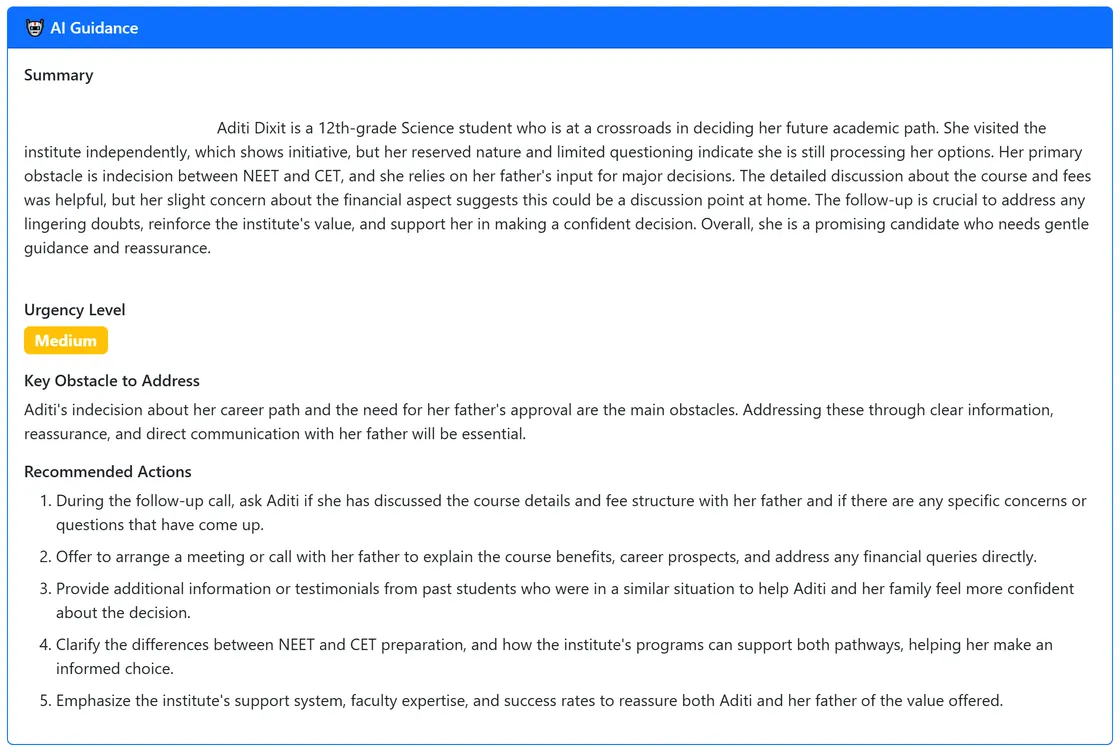

  • Joining chance out of 10
  • Key obstacle
  • Urgency
  • Next actions
AI Guidance panel: a written summary of the session, urgency level Medium, the key obstacle to address and five recommended actions.
A real AI report from a demo institute. Every word was written by the AI from the counsellor's form.
Counsellor's note in the app, typed in Marathi in English letters.

"Mulga khup serious aahe NEET sathi. Baba fees madhe thoda tension madhe hote pan installment option sangitlyavar relax zale. Aai khup supportive aahe. Strong lead."
What the counsellor typed, in Marathi with English letters.

AI 2 · For the owner

A business action plan for your branch

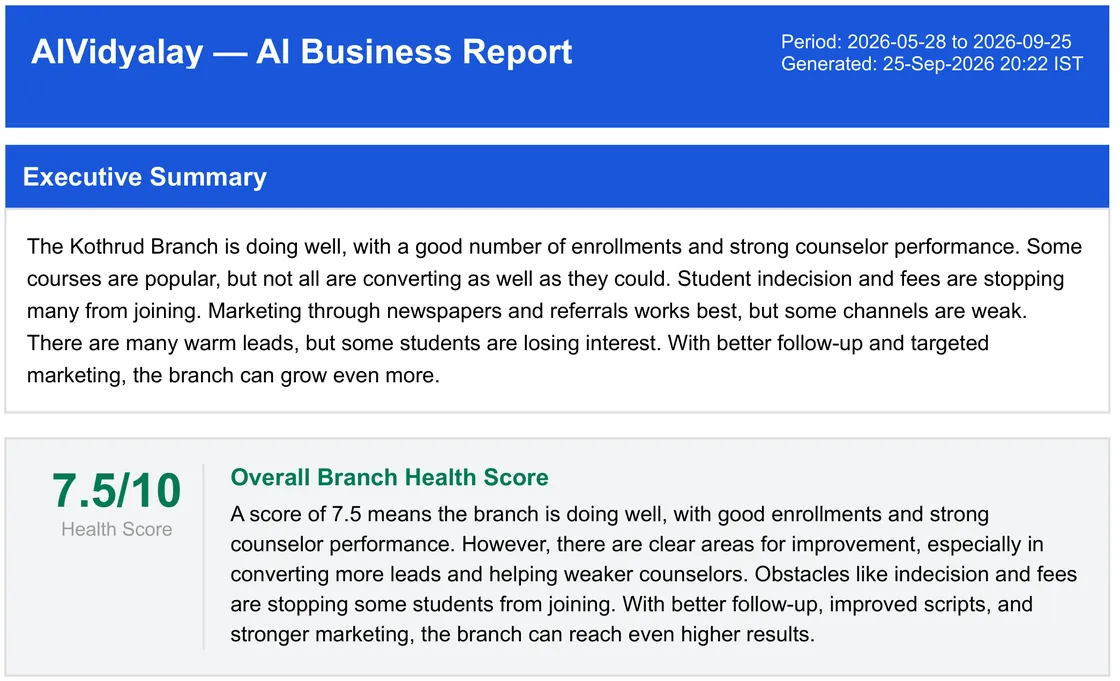
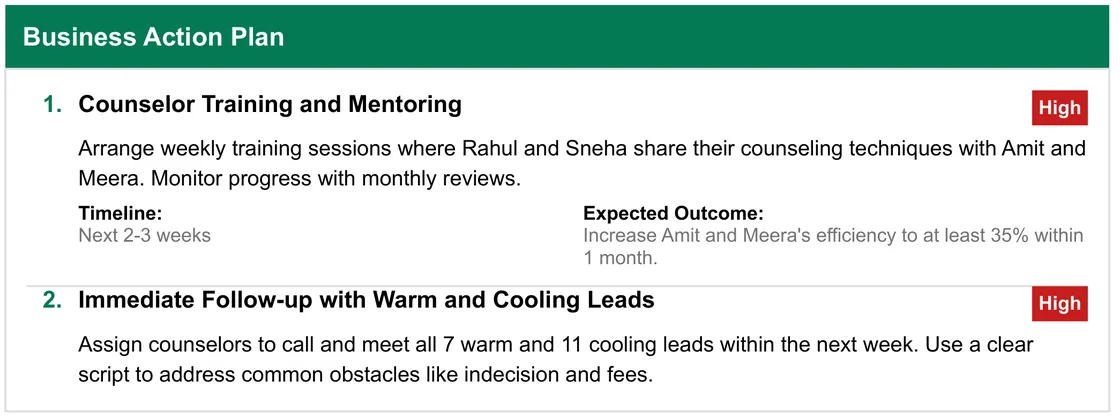
Choose a date range and press one button. The AI reads all eight business reports together and, in under a minute, gives you a PDF report. It includes a branch health score out of 10, a short summary, and an action plan where every action has a priority, a timeline and an expected outcome. It also points out the links between reports that no single chart shows.

  • Branch health score
  • Action plan with priorities
  • Insights across all eight reports
AI business report: executive summary and an overall branch health score of 7.5 out of 10.
Branch health score and executive summary.
AI business report action plan: actions with High or Medium priority, a timeline and an expected outcome for each.
Every action has a priority, a timeline and an expected outcome.

AI 3 · For the front desk

Your paper enquiry register, read for you

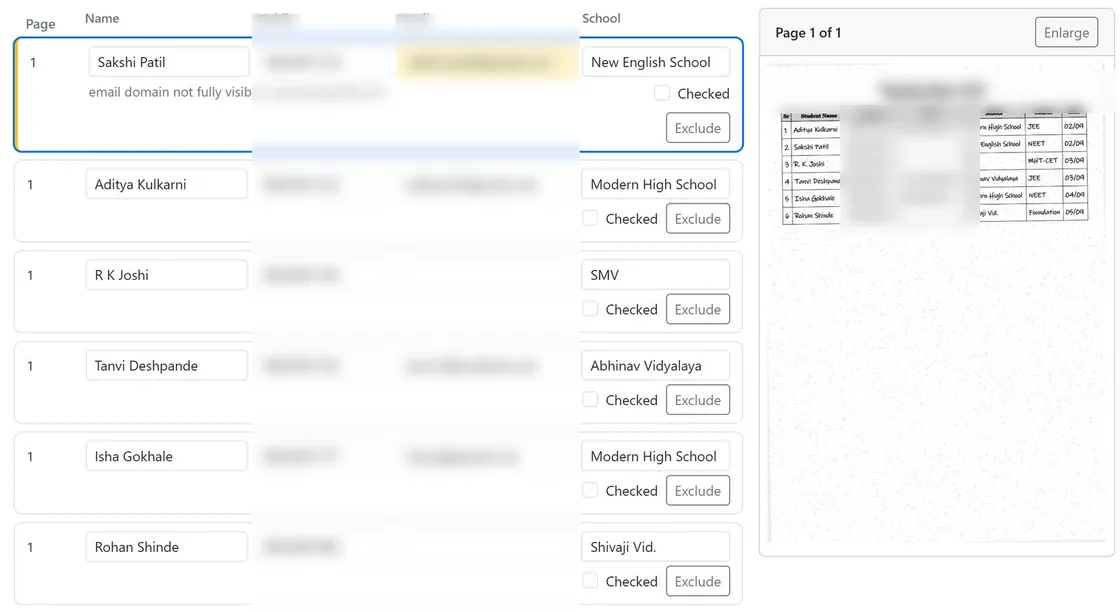
Scan up to 10 pages of your enquiry register into one PDF and upload it. The AI reads each student's name, mobile number, email and school, and highlights anything it is not sure about. Your staff check every row beside the scanned page, and nothing is saved until they press Save. Enquiries written on paper can now get the follow-up call they deserve.

  • Marathi or Hindi names come back in English letters
  • Doubtful fields highlighted
  • A person checks before saving
Register review screen: the rows the AI read on the left, the scanned register page on the right. One email is highlighted with the AI's note that the domain was not fully visible.
The rows the AI read, beside the scanned page. Sample register; mobile numbers and emails blurred.

Everything else in one place

Admission and fee management for coaching institutes, in one simple system.

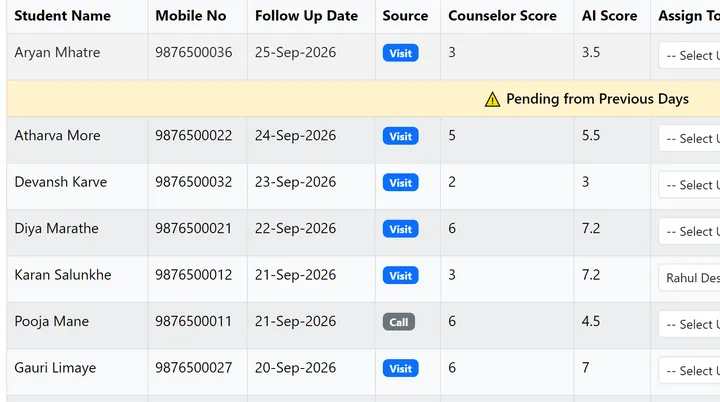
  • Daily follow-up list with the counsellor's score and the AI score on every row, and a Pending from Previous Days banner.

    The daily follow-up list

    One list for the whole branch, every morning. Overdue calls stay at the top until someone records a call. Each row can be given to a named staff member.

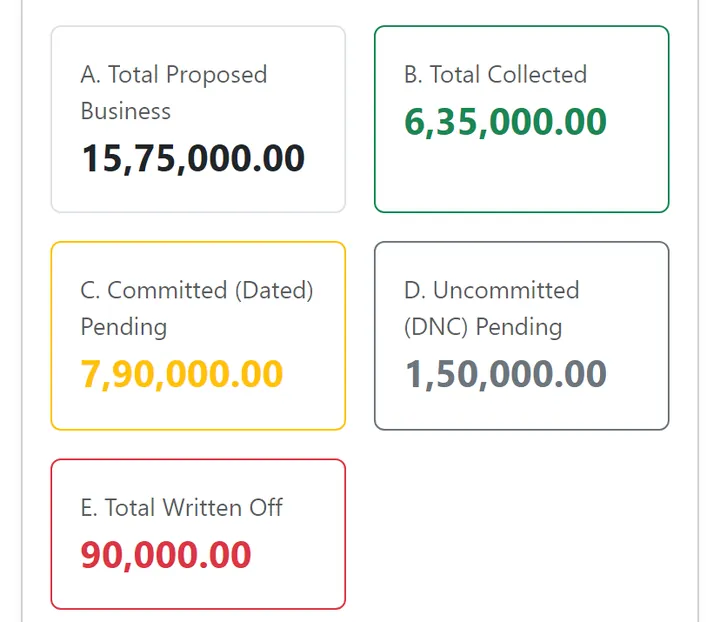
  • Fees collection summary: total proposed business, total collected, committed pending, uncommitted pending and total written off.

    Fees collection

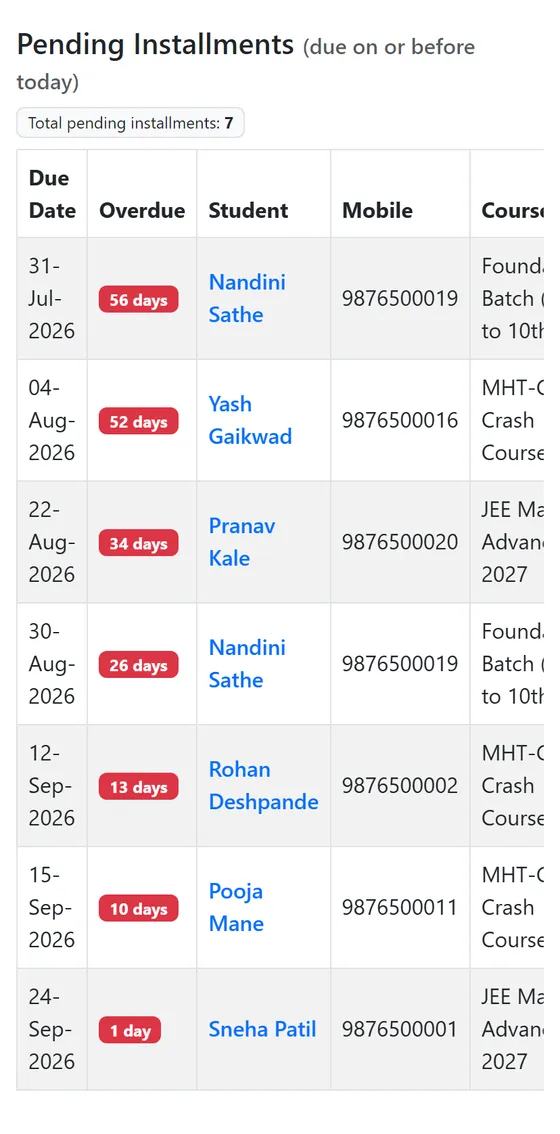
    Your fee position in five numbers that always add up: total, collected, pending with a date, pending without a date, and written off. Overdue instalments are listed every morning, oldest first. A saved payment can never be edited or deleted; a mistake is reversed with a written reason.

  • Lead temperature report: warm, cooling and cold leads, and total leads not yet enrolled.

    Eight business reports

    Your best counsellors, course demand and conversion, the biggest reasons students do not join, where your walk-ins come from, effort per admission, and which leads are going cold.

  • Each branch kept separate

    Staff see only their own branch's students, visits, calls and fees. Your institute's data is kept separate from every other institute's.

  • Bring your data in, take it out

    Import existing enquiries from Excel, up to 2,000 at a time. Duplicates are caught by mobile number. Any student list downloads to Excel.

  • AIVidyalay fees screen on a phone.

    Nothing to install

    AIVidyalay runs in the browser on a computer, tablet or phone. Your staff just sign in.

What it can mean for your turnover

Example

Say 100 students walk in every month. If just 5 more of them join, at ₹60,000 a course, that is ₹3,00,000 (₹3 lakh) more every month.

Try it with your own numbers

Extra turnover per month

₹3,00,000 (₹3 lakh)

Extra turnover per year

₹36,00,000 (₹36 lakh)

This is an estimate to help you think about your numbers, not a promise of results.

Frequently asked questions

Do we need to install anything?

No. AIVidyalay runs in a web browser on a computer, tablet or phone. Your staff just sign in.

Can my counsellors type in Marathi or Hindi?

Yes. They can type in Marathi or Hindi using English letters, the way they speak. The AI understands it and writes the report in simple English.

Is our data kept separate from other institutes?

Yes. Your institute's data is kept separate from every other institute's. Inside your institute, each branch is separate too: staff see only their own branch.

Does it send SMS or WhatsApp messages to students?

No. AIVidyalay does not send SMS, WhatsApp or email to students or parents. It tells your staff whom to contact and when, and a person makes the call.

Does it handle attendance, exams or timetables?

No. It does not handle attendance, marks, exams, timetables, hostel or transport. It focuses on admissions and fee collection, the part of your business that decides your income, and works alongside whatever you use for academics.

Does the AI decide anything or contact students?

No. The AI reads what your staff enter, writes it up and suggests next steps. Every decision and every call is made by your team. Its joining-chance score is a judgement, not a guarantee.

What if our enquiries are still in a paper register?

Scan the pages into a PDF, up to 10 pages at a time. The AI reads the students in, and your staff check every row before it is saved.

How much does it cost?

Please contact us for pricing. The demo is free.

Can we see it on our own data?

Yes. We give you a free demo on your own branch data, including an AI business report made from your own numbers.

Mandar Deshpande, founder of AIVidyalay

About the founder

Mandar Deshpande · Founder, AIVidyalay

Mandar Deshpande has more than 9 years of experience in the education industry. Today he works as a Product Manager in an IT organisation. AIVidyalay brings these two sides together: he knows the daily problems of an institute from the inside, and he knows how to build software that people actually use. He is based in Kolhapur, and AIVidyalay is built for coaching institutes across Maharashtra.

See it on your own branch data.

Book a free demo. We will show you AIVidyalay on your own branch data, including an AI business report made from your own numbers.